On-device OCR
Text that was stuck
is selectable again.
Apple Vision recognizes text locally at the original capture resolution.
OpenSnapX is a native screenshot workspace for capturing, annotating, redacting, and exporting—without an account, telemetry, or cloud upload.
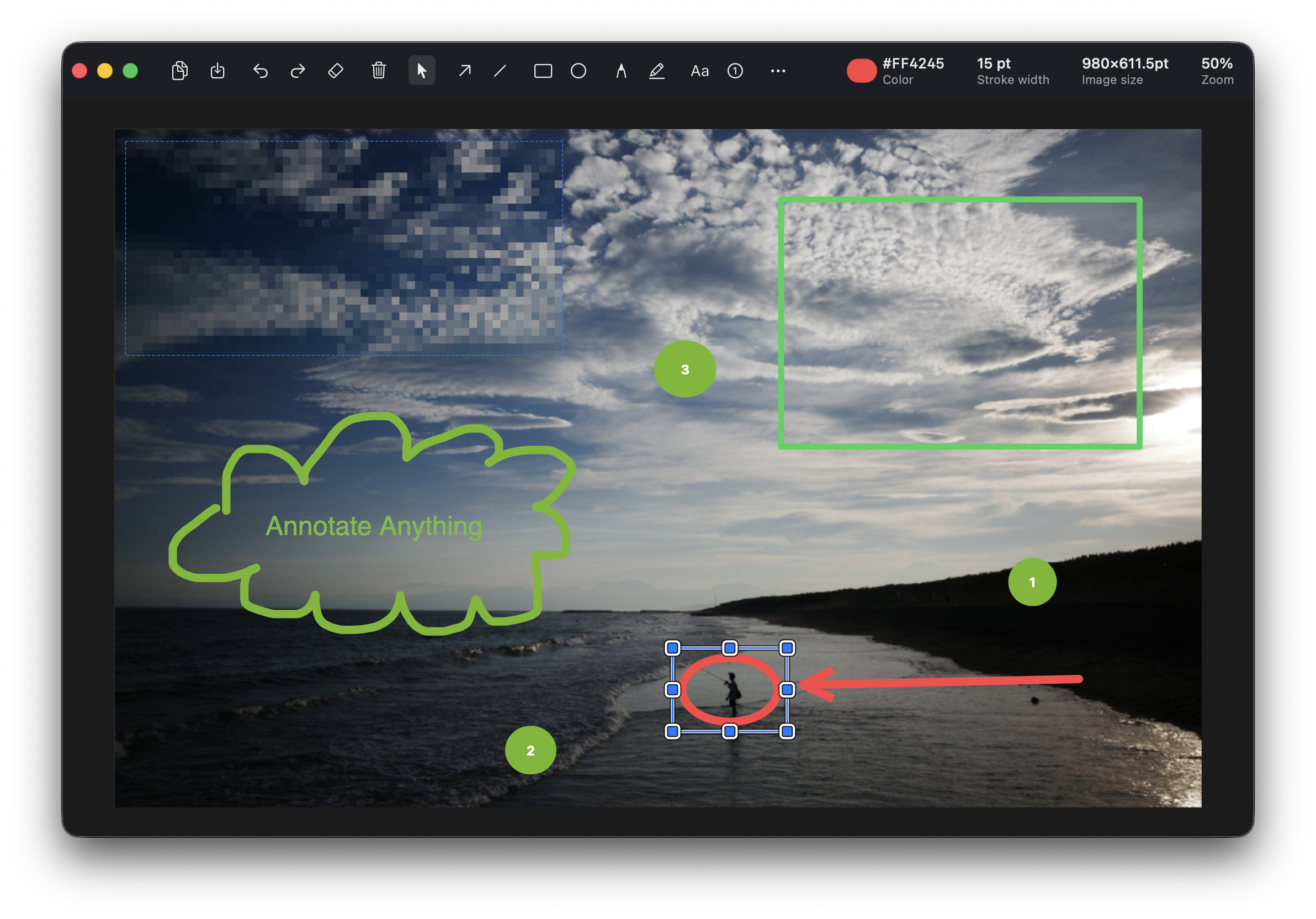
Capture exactly what you need, make the important part unmistakable, then move on.
Capture a precise area, a window, an entire display, selectable text, or a long scrolling view. Multi-display overlays stay sharp on Retina screens.
Use arrows, lines, shapes, text, pen, highlights, counters, blur, pixelation, solid redaction, and crop—all without touching the original image.
Apple Vision recognizes text locally at the original capture resolution.
Reopen captures with annotations intact. Automatic cleanup keeps storage predictable.
Float a capture above other windows while you work.
Add focused backgrounds, spacing, rounded corners, and shadow before export.
OpenSnapX has no analytics, advertising, account system, cloud upload code, or Internet requests. Normal captures and OCR stay on your Mac.
Read the full privacy policy ↗No accountInstall it and capture. There is nothing to sign into.
No telemetryYour usage and screen contents are not measured.
On-device OCRText recognition uses Apple Vision on your Mac.
You control retentionEditable history defaults to seven days and can be changed or disabled.
When you explicitly enable it, OpenSnapX can expose focused capture and on-device OCR tools through a local Unix socket. It is off by default, uses no network port, and keeps agent captures out of history.
For advanced workflows · Screen Recording permission only› Read the build error in Xcode
Finding “Xcode” windows…
✓ Captured without focusing the app
Cannot convert value of type…OpenSnapX is under active development. Expect rough edges while the core experience settles.
Not as a signed, notarized release yet. The project is a work in progress and can currently be built from source with Xcode 16 and XcodeGen.
OpenSnapX targets macOS 14 Sonoma or later. Final downloadable build architecture support will be confirmed before release.
Yes. The application is free software licensed under GPL-3.0, with no accounts, subscriptions, or paid cloud service.
macOS requires this permission for screenshot utilities to read screen and window contents. OpenSnapX does not request Accessibility permission for capture.
A redacted export is flattened, but the editable source remains in local history until you delete it or its retention period expires.
Follow development, report reproducible bugs, or help build a native screenshot workflow that stays yours.
Visit the GitHub project Work in progress · macOS 14+ · GPL-3.0